
Yes. RampedUp offers Email Validation as a standalone product within the platform, found at basic.rampedup.io/app/exhaustappending. There are two versions (or steps) to the process: the first step is free and does not decrement any credits, and the second step decrements credits. The box at the top of the page can also be used for one-off, real-time email validation at no cost.
How the validation works
Our Email Validation solution is a waterfall in four parts. We first work directly with the recipient email server to determine whether the record is VALID, INVALID or CATCH ALL. If the record is CATCH ALL or UNKNOWN, we call the company's Active Directory for authentication. Next, we promote these records to DETERMINISTIC if we can find the email on the public web. Finally, we bundle email delivery responses into a cache of 2.8 billion signals that we call our Email Exhaust — the Exhaust is then applied to any outstanding record without a VALID response.
Step 1: Pre-Validation (free)
Import a CSV of up to 100,000 email addresses and RampedUp will evaluate them using the results from our Email Exhaust. After the list is imported, you will be asked to name and save it. Once complete, you'll be notified by email, where you can further validate, analyze, or append the list. The system provides three choices:
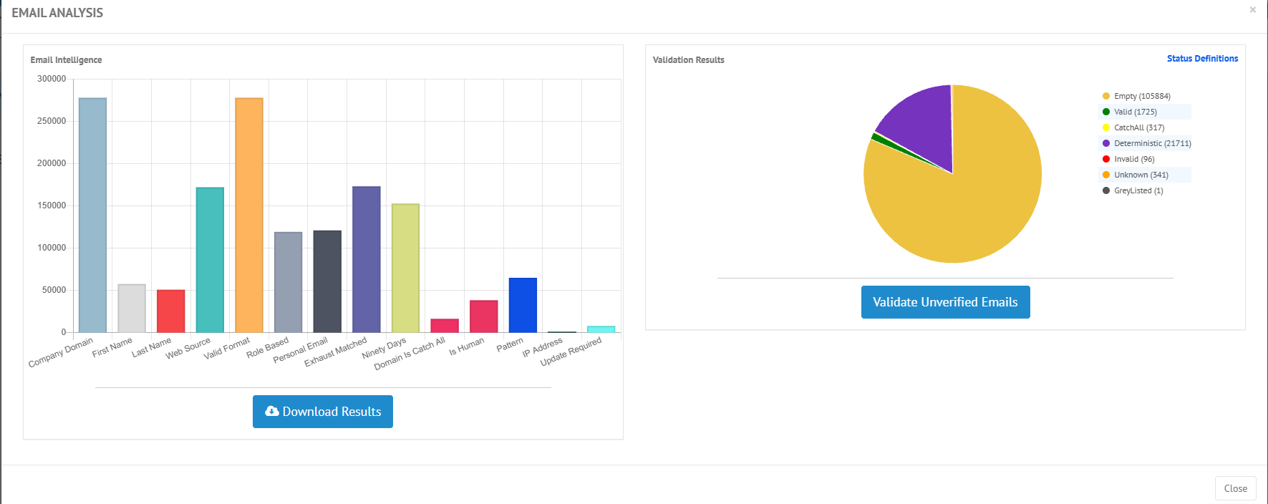
- Download List — opens a page with two charts and a button to download the list:
- Email Intelligence — a bar chart with the counts of enhanced fields from pre-validation.
- Validation Results — a pie chart showing a relative comparison of the email validation statuses.
- Append Contact Details — sends the list to Contact Data Appending.
- Append Company Details — sends the unique company domains to Company Data Appending.
Step 2: Real-Time Validation (paid)
Under the Validation Results chart on the Download List page, select VALIDATE UNVERIFIED EMAILS to kick off Step 2. This step only validates email addresses that can be validated: if the pre-validation results are within 90 days, or the address can be updated with a real-time validation, it is flagged TRUE under UpdateRequired. Addresses already marked Role-Based, Invalid, Personal, or Deterministic are flagged FALSE, because running them through real-time validation will not change the result.
Real-Time Validation consists of SMTP negotiation — the traditional method that returns a VALID or INVALID response from the recipient server — and Active Directory authentication, which calls the company's Active Directory API to validate the address. The results of both steps are merged into one CSV after this step.
Fields provided
The results combine the traditional validation status with a detailed analysis of each address from the four-step waterfall. For the full list of fields returned, and what each one means, see What are the fields provided in the Email Validation and Pre-Validation results?