
In June, we updated 307,633,594 contact records and increased the contact data file by 4,891,487 active contacts. These numbers encompass the growth of 50,874 personal email addresses 471,109 mobile phones. The number of Valid professional email addresses grew by 172,339 this month as well.
For our June Data Dictionary with counts – click here!
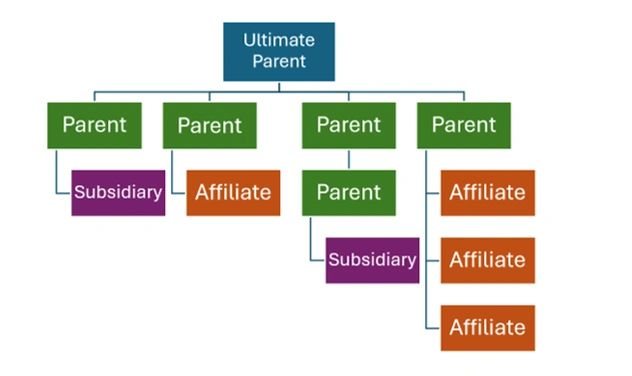
We are very happy to introduce our corporate family tree within the company delivery and within the Company List Building in the user interface. Now, you can now choose from a drop-down menu in Company Type for Parent / Subsidiary / Affiliate. Below are the definitions to help you better understand or thinking:
- Ultimate Parent: The Ultimate Parent distinction is given to entities that have a Parent with a Subsidiary in their corporate family tree.
- Parent: These entities have been identified as having either a Subsidiary company, an Affiliate branch or division, or both in their corporate family tree.
- Subsidiary: These entities have been identified as Subsidiary to their Parent because we were able to identify the entity’s place in a hierarchy from publicly available sources.
- Affiliate: These companies share a common root domain with their Parent or Subsidiary of a Parent. They will always have a non-distinct root domain but less employees or social followers than the Parent or Subsidiary of the Parent. These are most often branch locations or separate divisions within a company.
To create the Corporate Family Tree, we first identified commonality within businesses that share a root_domain. These records have the entity_type of Affiliate and point to the Parent in the parent_company_ru_id field. Most often, these records represent a location, division, or regional entity of the parent company.
However, this also applies to redirected websites that were once active but now point to a domain that is already represented in our database. In these instances, the once active URL can be found in the other_websites field and the destination that receives the redirect is placed in the website field.
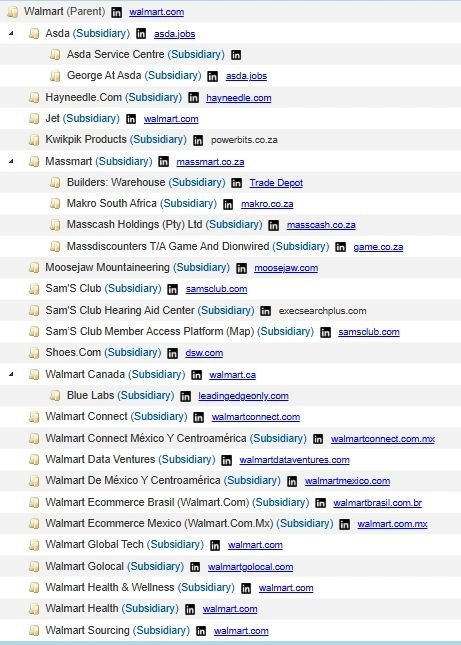
We also identify corporate relationships when companies list their subsidiaries on their social media, corporate websites, or public filings. In these instances, we associate an entity_type of Subsidiary to the record and point to the Parent in the parent_company_ru_id field. In some instances, however, we can identify a hierarchy where an entity_type of Parent also has a Parent. In these instances, we identify the top of the corporate family tree with the ultimate_parent_company_ru_id field.
We are working on exposing the family tree in our Battle Cards so stay tuned.